الأجوبة
// Java program to create a simple calculator
// with basic +, -, /, * using java swing elements

import java.awt.event.*;
import javax.swing.*;
import java.awt.*;

public class CalculatorJFrame extends JFrame implements ActionListener      {

        // create a frame
    static JFrame f;

    // create a textfield
    static JTextField l;

    // store operator and operands
    String s0, s1, s2;

    /**
     * Creates new form NewJFrame
     */
    public CalculatorJFrame() {
         s0 = s1 = s2 = "";
    }

    /**
     * This method is called from within the constructor to initialize the form.
     * WARNING: Do NOT modify this code. The content of this method is always
     * regenerated by the Form Editor.
     */
    @SuppressWarnings("unchecked")
    // <editor-fold defaultstate="collapsed" desc="Generated Code">
    private void initComponents() {

        setDefaultCloseOperation(javax.swing.WindowConstants.EXIT_ON_CLOSE);

        javax.swing.GroupLayout layout = new javax.swing.GroupLayout(getContentPane());
        getContentPane().setLayout(layout);
        layout.setHorizontalGroup(
            layout.createParallelGroup(javax.swing.GroupLayout.Alignment.LEADING)
            .addGap(0, 400, Short.MAX_VALUE)
        );
        layout.setVerticalGroup(
            layout.createParallelGroup(javax.swing.GroupLayout.Alignment.LEADING)
            .addGap(0, 300, Short.MAX_VALUE)
        );

        pack();
    }// </editor-fold>

    /**
     * @param args the command line arguments
     */
    public static void main(String args[]) {
      // create a frame
        f = new JFrame("calculator");

        try {
            // set look and feel
            UIManager.setLookAndFeel(UIManager.getSystemLookAndFeelClassName());
        }
        catch (Exception e) {
            System.err.println(e.getMessage());
        }

        // create a object of class
        CalculatorJFrame c = new CalculatorJFrame();

        // create a textfield
        l = new JTextField(16);

        // set the textfield to non editable
        l.setEditable(false);

        // create a Jlabel
        JLabel jl = new JLabel("developed by: abdullah algamdi");

        // create number buttons and some operators
        JButton b0, b1, b2, b3, b4, b5, b6, b7, b8, b9, ba, bs, bd, bm, be, beq, beq1;

        // create number buttons
        b0 = new JButton("0");
        b1 = new JButton("1");
        b2 = new JButton("2");
        b3 = new JButton("3");
        b4 = new JButton("4");
        b5 = new JButton("5");
        b6 = new JButton("6");
        b7 = new JButton("7");
        b8 = new JButton("8");
        b9 = new JButton("9");

        // equals button
        beq1 = new JButton("=");

        // create operator buttons
        ba = new JButton("+");
        bs = new JButton("-");
        bd = new JButton("/");
        bm = new JButton("*");
        beq = new JButton("C");

        // create . button
        be = new JButton(".");

        // create a panel
        JPanel p = new JPanel();

        // add action listeners
        bm.addActionListener(c);
        bd.addActionListener(c);
        bs.addActionListener(c);
        ba.addActionListener(c);
        b9.addActionListener(c);
        b8.addActionListener(c);
        b7.addActionListener(c);
        b6.addActionListener(c);
        b5.addActionListener(c);
        b4.addActionListener(c);
        b3.addActionListener(c);
        b2.addActionListener(c);
        b1.addActionListener(c);
        b0.addActionListener(c);
        be.addActionListener(c);
        beq.addActionListener(c);
        beq1.addActionListener(c);

        // add elements to panel
        p.add(jl);
        p.add(l);
        p.add(ba);
        p.add(b1);
        p.add(b2);
        p.add(b3);
        p.add(bs);
        p.add(b4);
        p.add(b5);
        p.add(b6);
        p.add(bm);
        p.add(b7);
        p.add(b8);
        p.add(b9);
        p.add(bd);
        p.add(be);
        p.add(b0);
        p.add(beq);
        p.add(beq1);

        // set Background of panel
        p.setBackground(Color.white);

        //f.add(jl);
        // add panel to frame
        f.add(p);
        f.setSize(200, 270);
        f.show();
    }
    public void actionPerformed(ActionEvent e)
    {
        String s = e.getActionCommand();

        // if the value is a number
        if ((s.charAt(0) >= '0' && s.charAt(0) <= '9') || s.charAt(0) == '.') {
            // if operand is present then add to second no
            if (!s1.equals(""))
                s2 = s2 + s;
            else
                s0 = s0 + s;

            // set the value of text
            l.setText(s0 + s1 + s2);
        }
        else if (s.charAt(0) == 'C') {
            // clear the one letter
            s0 = s1 = s2 = "";

            // set the value of text
            l.setText(s0 + s1 + s2);
        }
        else if (s.charAt(0) == '=') {

            double te;

            // store the value in 1st
            if (s1.equals("+"))
                te = (Double.parseDouble(s0) + Double.parseDouble(s2));
            else if (s1.equals("-"))
                te = (Double.parseDouble(s0) - Double.parseDouble(s2));
            else if (s1.equals("/"))
            {
                te = (Double.parseDouble(s0) / Double.parseDouble(s2));
            }
            else
                te = (Double.parseDouble(s0) * Double.parseDouble(s2));

            // set the value of text
            if(Double.parseDouble(s2)==0)
            {
                l.setText("can not divide on zero !");
                // clear the one letter
                s0 = s1 = s2 = "";
            }
            else {
            l.setText(s0 + s1 + s2 + "=" + te);

            // convert it to string
            s0 = Double.toString(te);

            s1 = s2 = "";
            }
        }
        else {
            // if there was no operand
            if (s1.equals("") || s2.equals(""))
                s1 = s;
            // else evaluate
            else {
                double te;

                // store the value in 1st
                if (s1.equals("+"))
                    te = (Double.parseDouble(s0) + Double.parseDouble(s2));
                else if (s1.equals("-"))
                    te = (Double.parseDouble(s0) - Double.parseDouble(s2));
                else if (s1.equals("/"))
                    te = (Double.parseDouble(s0) / Double.parseDouble(s2));
                else
                    te = (Double.parseDouble(s0) * Double.parseDouble(s2));

                // convert it to string
                s0 = Double.toString(te);

                // place the operator
                s1 = s;

                // make the operand blank
                s2 = "";
            }

            // set the value of text
            l.setText(s0 + s1 + s2);
        }
    }
    // Variables declaration - do not modify
    // End of variables declaration
}
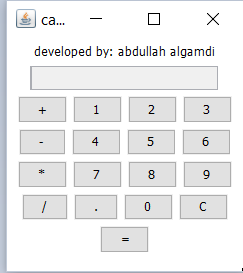
شاشة المخرجات:
أسئلة مشابهة
القوائم الدراسية التي ينتمي لها السؤال